
Table of Contents
- Rules and Safety
- 3D Printer
- Laser Cutter and Engraver
- 3D Scanner
- Bela Kits
- Availability, Support, and Location
Rules and Safety
- Memorize UiO-specific and generic emergency numbers (Fire: 110, Police: 112, Ambulance: 113, UiO Security Operation Centre Emergency Number 22 85 66 66)
- The makerspace has a maximum capacity of three users.
- Access is regulated by card, do not let others in the room if they do not have a valid access card.
- Consumption of any food and any drink is not allowed in the makerspace.
- Do not remove anything (tools or other equipment) from the makerspace, and do not alter the technical infrastructure.
- Leave the room in order. Tools must be placed back exactly where found; all storage boxes are labeled.
- Clean up any debris on the desk and floor that you may have produced.
- Consumables (i.e. wires, components, tape, soldering wire, connectors, boards, 3D printing material, laser cutter material) can be used exclusively for authorized course or thesis-related projects. Bring your own consumables for personal projects. The use of laser cutter and 3D printer for personal projects is not allowed, even if using your own consumables.
- Do not leave personal belongings in the room.
- When leaving the room, all equipment must be switched off and unplugged from power.
- The laser cutter and 3D printer can cause severe injuries. Their use is restricted to authorized users who have completed specific training. Having access to the room does not imply that one is allowed to utilize these tools.
- Use only approved materials with the laser cutter and 3D printer. Do not attempt to cut or engrave cardboard, paper, plastic or metal materials.
- When the laser cutter or 3D printer is operating, do not touch the moving heads or put your hands inside the working area. If you need to intervene, pause the job first.
- When using the laser cutter, the exhaust pipe must be placed well outside the open window, the fan must be running, and the enclosure zipped.
- When the laser cutter is in use, everyone inside or entering the makerspace must wear laser protective glasses. Do not stare continuously at the laser blue light, even through glasses and filters.
- When using acrylic with the laser cutter, wear a face mask.
- Do not leave the laser cutter running unattended. Wait until the job is complete or pause/stop it if leaving is absolutely necessary.
- Put back the lockout on the laser cutter power cable when done using it.
- When soldering, wear the transparent protective glasses and use the fume extractor at all times.
- When soldering, avoid wearing shorts, open shoes, excessively loose clothes, loose bracelets, watches, and metal accessories.
- When soldering, use clamps (i.e. pincers, third hand) to hold hot components.
- Use a wet sponge and brass sponge to keep the soldering iron tip clean.
- Soldering irons and hot air gun must always be switched off and unplugged from power when leaving the room, including short breaks.
- Violation of safety rules may result in a temporary or permanent ban from accessing the makerspace.
- If unsure about something, ask IMV staff rather than attempting something that may be dangerous or damaging/wasting materials or tools.
- For more safety related information, check Sikresiden.no.
3D Printer
The Makerspace is equipped with a Bambu Lab X1-Carbon 3D Printer with a 0.4mm nozzle.

To design 3D models we recommend using Autodesk Fusion 360 for personal use (free).
Designed models should be exported as .stl files and then imported in Bambu Studio (free) projects. Since the printer is not connected to the network, projects to be printed must be exported to .gcode.3mf file using "export sliced file", placed on the root directory of a micro SD card, which then has to be inserted in the 3D printer.
Printing material is not stored in the makerspace, and must be requested beforehand.
Resources
Bambu Lab X1-Carbon Quick Start Guide
Bambu Lab X1-Carbon Maintenance (video)
Laser Cutter and Engraver
The Makerspace is equipped with a Elegoo Phecda Laser Engraver & Cutter with a 20W diode laser and air assist set.
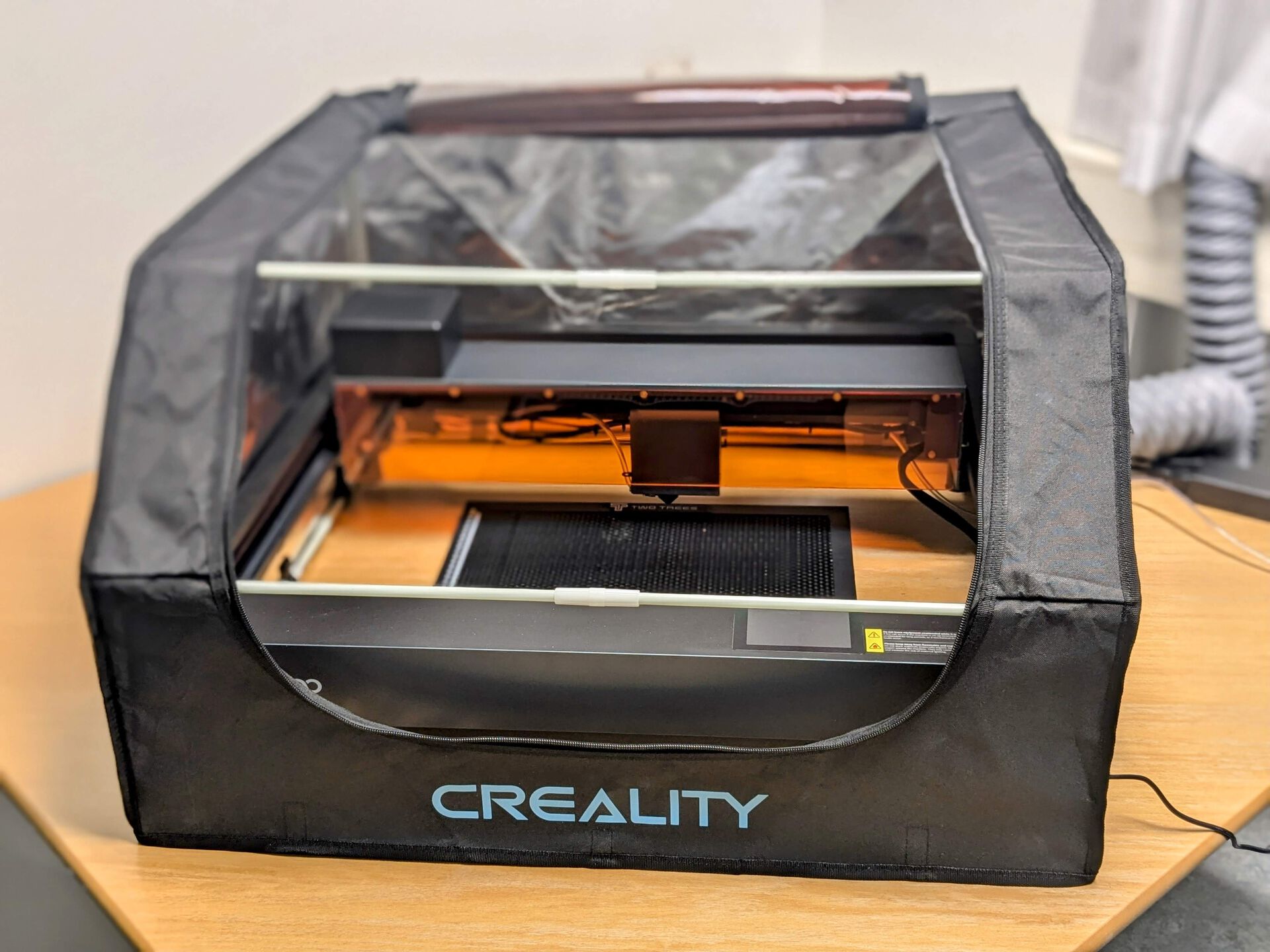
To layout and edit designs for the laser cutter we recommend using Lightburn (30 days free trial, temporary licenses available on request).
Designs must be exported as .nc files and placed on the root directory since the cutter is not connected to the network. Exported files must be placed on the root directory of a micro SD card, which then has to be inserted in the laser cutter.
Cutting materials are not stored in the makerspace, and must be requested beforehand.
Resources
Elegoo Phecda Laser Engraver & Cutter Quick Start
Elegoo Phecda Laser Engraver & Cutter Manual
Elegoo Phecda Laser Engraver & Cutter Maintenance
Test cut and engrave on 3mm plywood and acrylic (configuration and test files)
Recommended settings:
- Plywood engrave: mode fill, 1 pass, 0.1 mm interval, speed 1600 mm/m (26.66 mm/sec), power 60% (use mode line for text layer or text-like engraving)
- Plywood 3mm cut: mode line, 1 pass, speed 300 mm/min (5 mm/sec), 60% power
- Acrylic engrave (wearing face mask recommended): mode 1 pass, 0.1 mm interval, speed 4400 mm/min (73.33 mm/sec), power 25% (use mode fill setting for text layer and text-like engraving)
- Acrylic 3mm cut (wearing face mask recommended): mode line, 1 pass, speed 80 mm/min (1.33 mm/sec), 80% power
3D Scanner
The Makerspace is equipped with a portable handheld 3D Scanner Shining 3D Einstar.

To scan objects and obtain 3D models, the scanner must be connected to a computer running Einstar Software (free). Scanned models can also be exported to 3D modeling editing and printing software.
The 3D scanner is not stored in the makerspace, and must be requested beforehand.
Resources
Bela Kits
The Makerspace has twenty kits including a Bela, and a selection of sensors and electronic components.

Additional sensors, actuators, single board computers, and components are available upon request.
Bela kits are not stored in the makerspace, and must be requested beforehand.
Resources
List of parts included in the kit
Availability
Support and Contact
Location and booking
- Location: ZEB-bygningen (floor 1)
- Booking: The makerspace has a maximum capacity of three users. Individual seats can be booked on Timeplan (TP). If seats are available, they can be taken on a first-come, first-served basis, but priority must be given to users who have booked a seat or to students of specific courses during semesters.